The category and tag pages
Open a category or tag to review its totals, payments, and settings in one place.
Every category and tag has its own detail page. Both use the same tiles, breakdowns, and payment list, so you can quickly see what belongs there and how much it contributes. Only their settings differ.
You reach them by clicking a tag anywhere it appears, by clicking a category in the analysis legend, or through the pencil in Settings → Categories & tags.
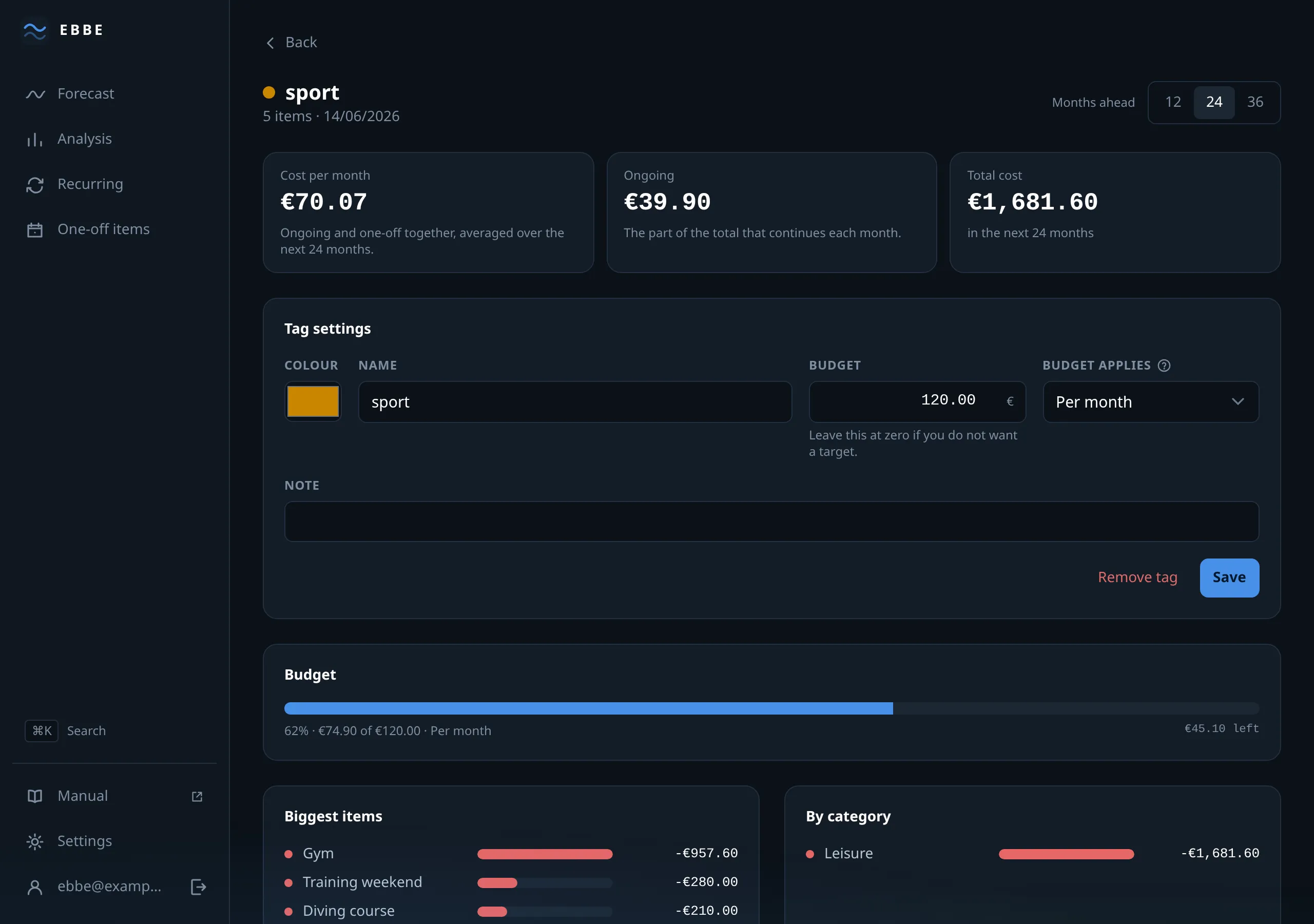
The tiles
Four figures for whatever you are looking at: per month, ongoing — shown only when something under it has no end date — total in range, and income in range.
“Ongoing” is the one to notice. It is what tells you this label contains a commitment rather than a finite project, and it is the same fact that makes a total tag budget behave the way it does.
The two breakdowns
Side by side on a wide screen. A category page breaks down by item and by tag; a tag page breaks down by item and by category.
The second one is where the two axes pay off. Open summer-trip and you see
what a holiday costs split across Mobility, Leisure, Insurance — which is a
question neither grouping could answer alone.
The bars are scaled to the largest row. They do not show percentages because tags may overlap: an item with two tags counts under both, so the shares could add up to more than 100%.
The payments
Every occurrence under this label, dated, with the item behind it. Two switches — Show past and Show paused — and a total for whatever is shown. The pencil opens the item, so you can fix something without leaving.
When the list is empty, the message distinguishes between “there is nothing here” and “your two switches are hiding it”, which saves the minute otherwise spent wondering.
Category settings
Colour, name, used for (expense, income or both), and archived.
Archiving takes a category out of the pickers without touching its history — the right move for something you have stopped using but still have past items in.
Delete category is here, and it says plainly what it does: the items stay and become uncategorised. A label is not money, and deleting one should never delete the other.
Tag settings
Colour, name, a budget with its period, and a note.
Renaming shows what your text will become — Summer Trip becomes
summer-trip — and the rename applies across every item carrying it. Remove
tag takes it off every item; the items themselves are untouched.
The period is the setting worth reading about before relying on it: tag budget periods.
Uncategorised
Items with no category collect on a page of their own, reachable from the analysis legend. It behaves like any category page except that there is nothing to configure — it is not a category, it is the absence of one — and Ebbe says so rather than showing an empty settings block.
It is worth visiting after deleting a category, which is the usual way items end up there.