Recurring items
Review, filter, and edit the income and fixed costs that return on a schedule.
Recurring items are the income and costs that return on a schedule: salary, rent, utilities, insurance, subscriptions, and loan payments. Together they usually form the foundation of the forecast.
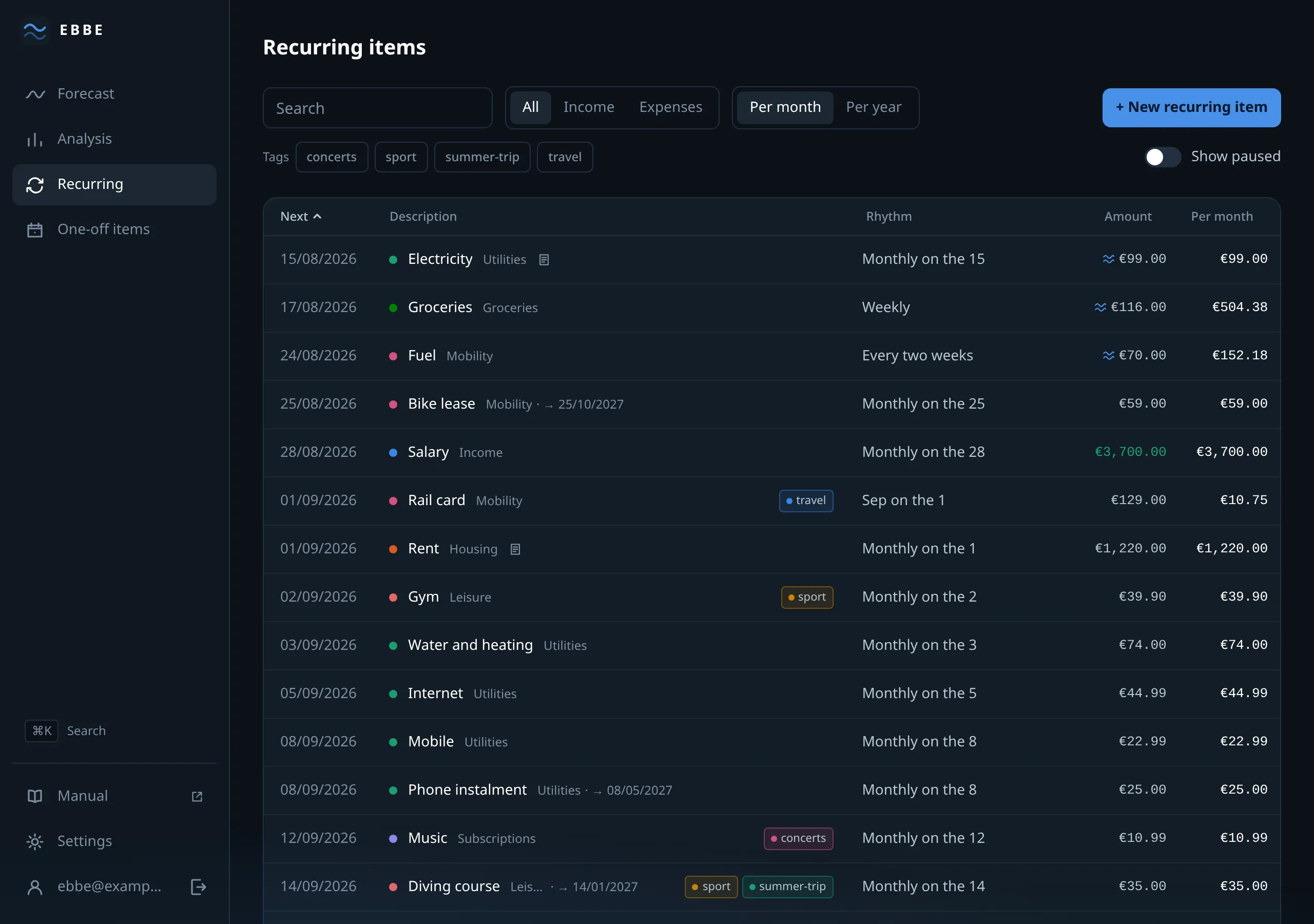
The list
Columns: Next, Description, Rhythm, Amount, and a derived figure per month or per year — a €600 yearly premium reads as €50 a month, which is what makes items with different rhythms comparable. Sorted by next payment, and every heading is a sort.
The derived column describes an item as it stands today and ignores any raise.
A row carries what it needs to: the category’s colour, the end date if there is
one, a ≈ for an estimate, a “paused” badge, a
note icon if you wrote one, and its tags. On a narrow window columns drop and
eventually the row folds onto two lines; nothing is removed, only rearranged.
The footer totals what is shown — which is what makes filtering useful, because the total follows the filter.
Filtering
A search box, All / Income / Expense, a per month / per year toggle, tag chips, and a Show paused switch. On a narrow window they collect behind a Filters button with a count on it.
Tag filtering is and: pick two and you see items carrying both.
The form
New recurring item, or the pencil on a row.
The top half is what you always fill in: direction, name, category, amount, and the rhythm. Amount is an estimate sits beside the amount on a narrow screen and under it once there is room for columns; at the top is a Paused latch.
The rhythm offers every N days, monthly, quarterly and yearly, which are presets over the two shapes described in rhythms and short months. Day of month runs 1 to 30 plus “last day”, and there is no 31st on purpose.
More options holds the rest, and its collapsed summary tells you which of them are filled, so you can see at a glance that an item has an end date without opening anything:
- Start date — when it begins. Future dates are fine and are how you enter a pay rise or a lease that starts in spring.
- End date — inclusive. This is what makes a forecast show the month a contract stops costing you.
- Raise and raise month — see raises.
- Note and tags.
At the bottom, a preview: what the item costs per month, and the next six dates it falls on, recomputed as you type. It is the fastest way to catch a rhythm that says something other than you meant.
Save and add another keeps the form open, which is the right way to enter a household in one sitting. ⌘/Ctrl + Enter saves.
Deleting
There is no delete on a row. It lives inside the form, on the left of the footer, behind a confirmation that says it removes every occurrence of the item — past and future — because that is what it does.
If what you mean is “this has stopped”, an end date is almost always the better answer: it keeps the months the item really was paid truthful. Deleting is for something entered by mistake.
Limits
Up to 500 recurring items. If you ever meet it, the message points at pruning rather than just refusing.