One-off items
Plan single payments and purchases that are split into even or custom instalments.
One-off items cover payments with a date rather than a repeating rhythm: a holiday, a repair, a new laptop, or a tax refund. They can happen once or be split into several instalments.
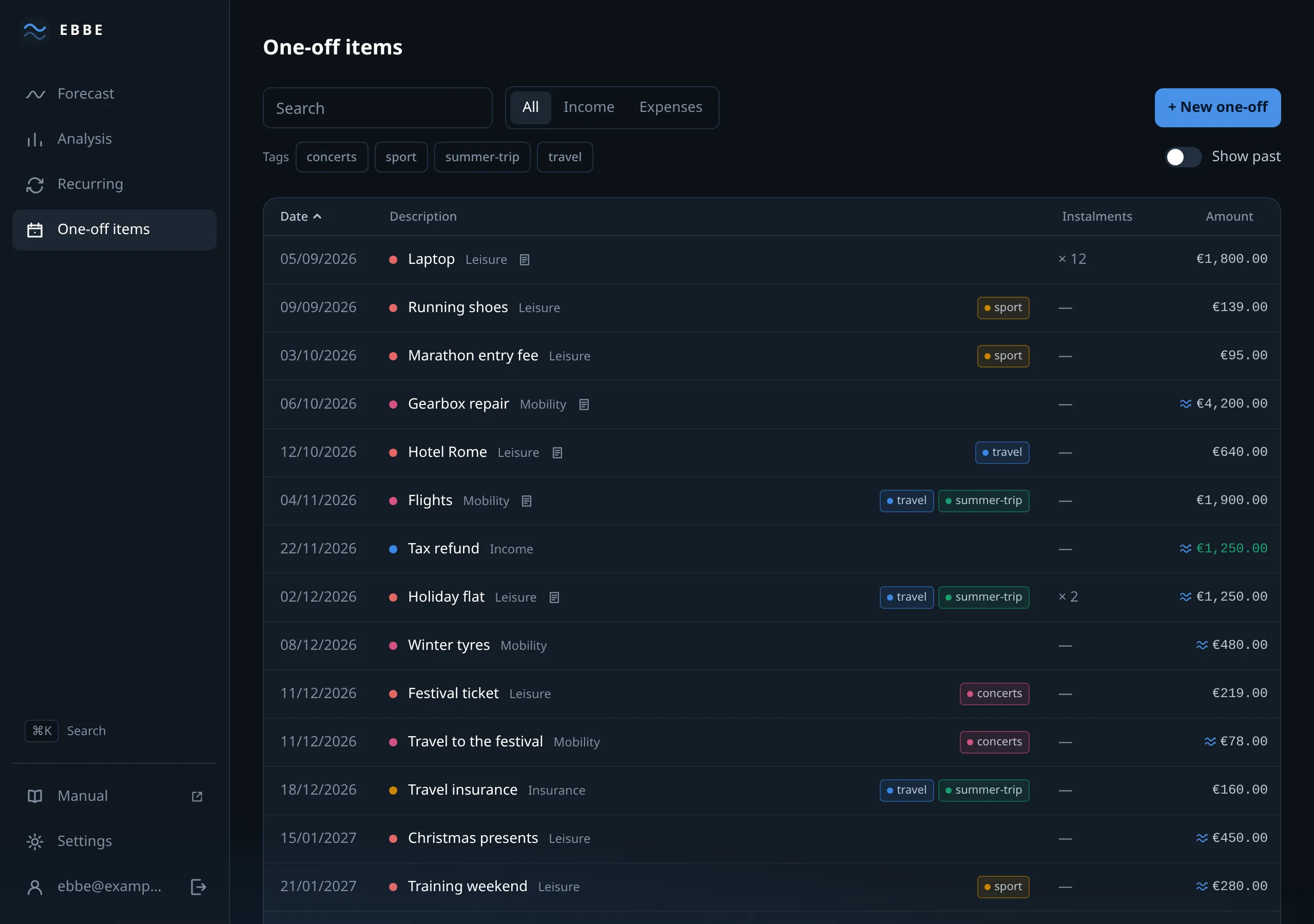
The list
Columns: Date, Description, Instalments, Amount. Sorted by date, and every heading is a sort.
The date shown is the first payment, which for a split item is not the only one. The instalments column is what tells you the difference.
Payments already in the past are dimmed rather than hidden, and a Show past switch takes them out entirely. Off by default, because a screen about what is coming should not open on last winter.
Filtering works the same way as the recurring list: a search box, income or expense, tag chips, and a footer that totals whatever is shown.
The three shapes
A single payment. A date and an amount.
Split evenly. An amount and a number of instalments, up to 120. Ebbe divides without losing a cent: €100 over three months is 33.34, 33.33, 33.33, not three times 33.33 with a cent unaccounted for. The first payment keeps the date you chose; the rest follow the same day of the month, clamped in short months as described in rhythms.
Enter each payment. For the case an even split cannot express — a deposit now and the balance in four months, or three unequal builder’s invoices. You write out the dates and amounts, and the total, the first date and the number of payments are all derived from what you wrote. When you enter a schedule, the schedule wins: the amount and date fields above become read-only, because they are now a summary rather than an input.
Up to 120 payments either way.
Choosing between them
The question to ask is when does the money actually leave the account, not when the thing happens.
A €1,800 laptop bought on a twelve-month plan is one one-off with twelve instalments, not twelve items and not one payment of €1,800 — because your balance in each of those months is what the forecast is trying to get right.
A holiday, on the other hand, is usually several items: the flights are paid in March, the flat has a deposit and a balance, the insurance is a single payment. Give them all the same tag and they still add up to one holiday on the analysis screen while staying honest about when each is paid.
The form
Direction, name, category, date, amount, and Amount is an estimate — worth using for anything you have not had quoted; a repair is exactly the kind of figure that should be marked soft.
Then the split: the toggle between split evenly and enter each payment, and
below it either an instalment count or a list of rows with a + to add and a
× to remove.
Notes and tags at the bottom, and a sentence confirming how the total will be divided.
Deleting
Inside the form, on the left of the footer, as with every other item in Ebbe. There is no delete on a row.
Limits
Up to 2,000 one-off items — the largest allowance in Ebbe, because this is the list that grows. If you reach it, pruning removes what is safely in the past without changing the forecast by a cent.