Settings
Adjust your budget, categories, tags, balance readings, language, and appearance.
On this page
Settings are organised into four tabs. Budget, Categories & tags, and Balances belong to the budget; Appearance stores your personal language and display preferences.
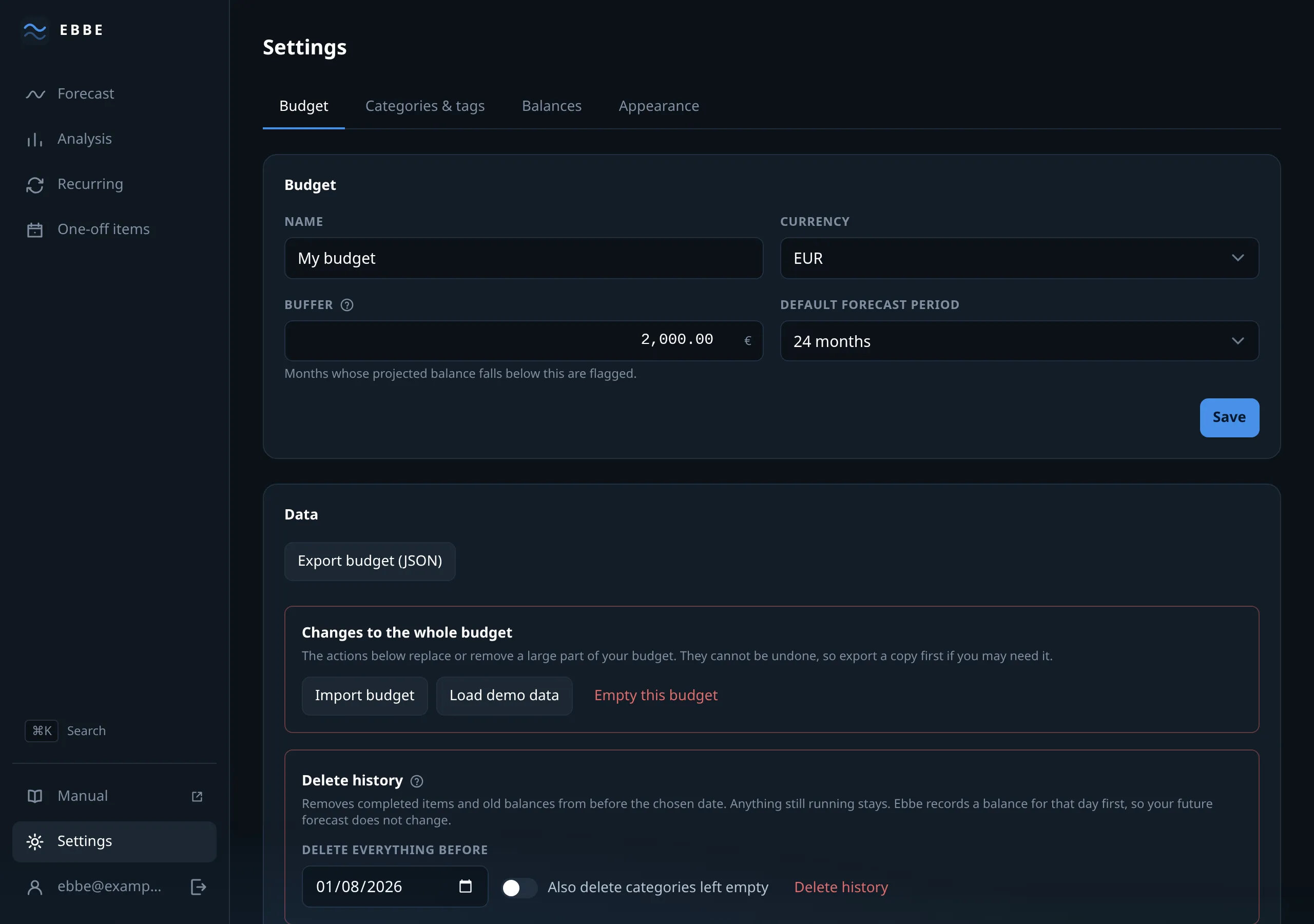
Budget
- Name — what this budget is called.
- Currency — EUR, CHF, GBP, USD, SEK, NOK, DKK, PLN or CZK. It belongs to the account book, not to the reader: everyone looking at this budget sees the same currency, whatever language they read it in.
- Buffer — the line the forecast measures against. Negative is allowed. See the buffer.
- Months ahead — 12, 24, 36 or 60. The default horizon.
Below, and hidden entirely for a demo account, the parts that move data in bulk:
- Export JSON — your whole budget as one file.
- Import — replaces the budget with a file. Behind a confirmation.
- Load demo data — clears the budget and fills it with the invented household. See the demo household.
- Empty budget — removes everything, keeps the account.
- Prune — removes what is safely in the past. See pruning.
The last four sit in a red-bordered block with the budget’s name written in it, because they are the four that cannot be undone by pressing the same button again.
Categories & tags
The catalogue, in one place: every category and every tag with its colour, its name, and how many items use it.
Categories can be renamed or recoloured in their row, and new ones are added at the bottom. To delete a category, open its detail page; that page also explains that its items will become uncategorised.
Tags are listed with their budgets and periods and can be edited in place. To create a tag, add it to an item; it will then appear in this list.
Both are covered in categories and tags.
Balances
Your balance readings, newest first: the date, the amount, and either “first reading” or the difference against what the plan had predicted for that day.
Underneath, the drift shows whether your plan tends to run ahead of reality or behind it across the readings you have taken. Check it occasionally to see whether an estimate or recurring cost needs updating.
New balance reading adds one; the pencil edits one. See the anchor, which explains what the stored prediction is and why it never changes.
Appearance
Yours, not the budget’s — these follow your account onto any device you sign in from.
- Colour scheme — automatic, light or dark. Automatic follows the system.
- Text size — small, medium or large. It scales the whole interface, and the layout is built to reflow with it rather than merely get bigger.
- Language — chosen per account. It changes the interface; it never
translates anything you typed. A category you named
HousingstaysHousing. - Date format — several, and the options show today’s date written each way rather than naming a pattern.
- Number format — likewise, shown as a rendered example.
Currency is not here. It is a property of the budget, above.